Server-side tracking for Shopify
In the world of e-commerce, accurate data is gold. But if you run a Shopify store, you've probably noticed it's getting harder to trust your analytics. Browser restrictions are tightening, ad blockers are common, and getting a clear picture of your customer journey is a headache.
The good news? There's a powerful solution that’s making tracking reliable again: Server-Side Tracking.
Think of it as the ultimate upgrade for your Shopify store's data collection. It’s a shift that boosts accuracy, enhances privacy, and simply helps your marketing work better.
What is Server-Side Tracking (Explained Simply)
To understand server-side tracking, let’s quickly look at the old way: Client-Side Tracking.
The Old Way (Client-Side): Imagine a customer, Sarah, adds a product to her cart on your Shopify store. Her web browser immediately sends that "Add to Cart" event directly to platforms like Google Analytics and Facebook Pixel using little bits of JavaScript code.
- The Problem: Ad blockers, privacy settings (like Apple’s ITP), and browser rules can block or limit those signals before they even leave Sarah’s device. This results in inaccurate conversion counts, missed data, and wasted ad spend.
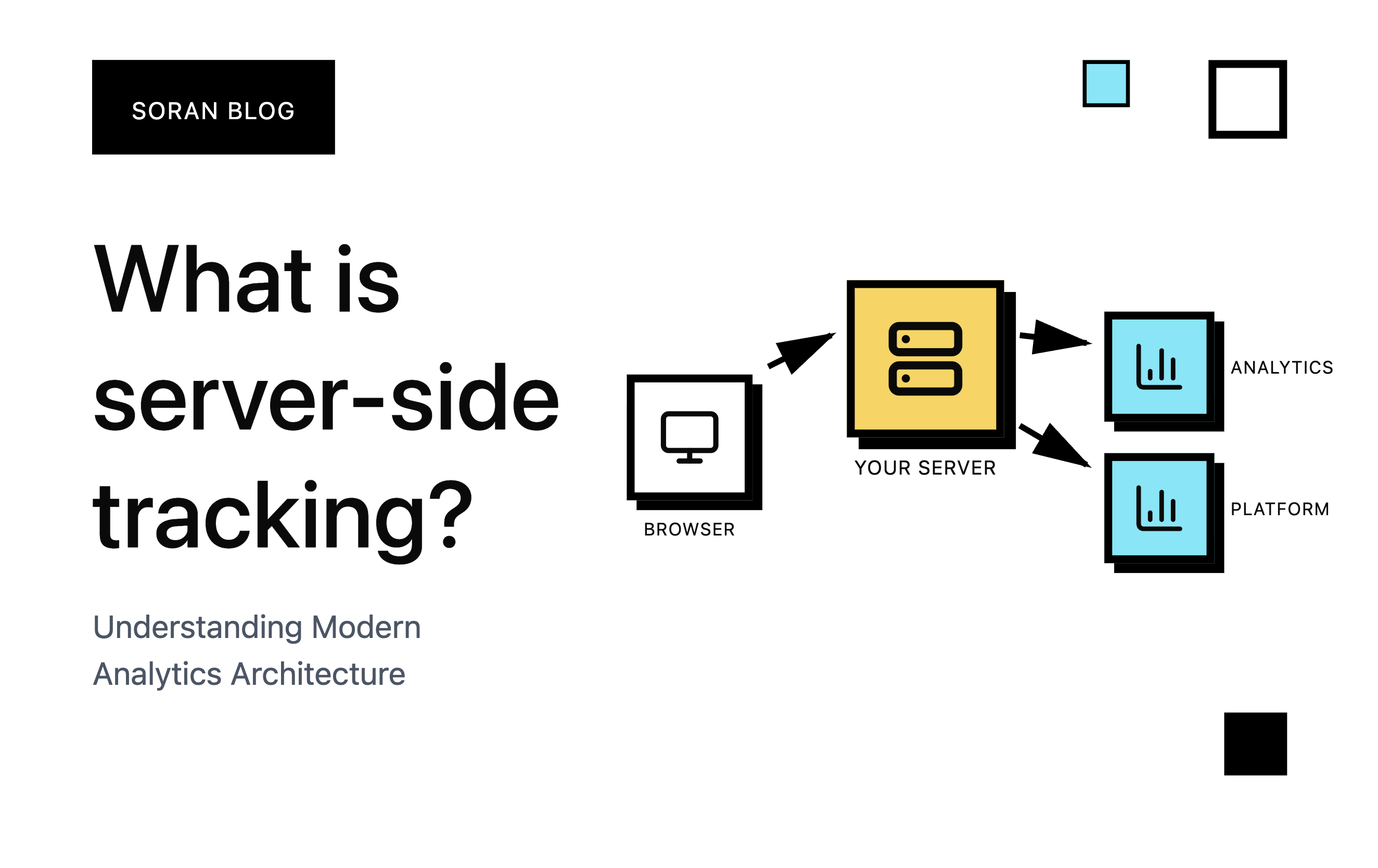
The New Way (Server-Side): When Sarah adds that item to her cart, the data is first sent to your own secure, dedicated server (often using a tool like Google Tag Manager Server-Side).
Your server then cleans, processes, and securely forwards the data to Facebook, Google, and other tools. Because the data is coming from your server and your domain, it looks legitimate and is much less likely to be blocked.
Why Every Shopify Store Needs This Upgrade
For a Shopify merchant, the benefits of moving to server-side tracking are huge, directly impacting your bottom line:
- Accurate Conversion Data (Finally!)
Server-side tracking bypasses the limitations that cause data loss.
- Example: If a customer uses an ad blocker and completes a purchase, your client-side Facebook Pixel might miss that conversion. With server-side tracking, your server captures the purchase event and sends it securely to Facebook’s Conversions API, ensuring your ad spend is correctly attributed. This means better retargeting and more effective Lookalike Audiences.
- Better Privacy and Compliance
Server-side tracking gives you full control over the data you send out.
- You can choose to anonymise or hash personal information (like email addresses) before it ever leaves your server, helping you stay compliant with GDPR and CCPA. It's a massive win for user trust.
- Faster Store Speed
Client-side tracking means forcing the user's browser to run multiple third-party scripts (Google Analytics, Facebook, TikTok, etc.). This can slow down your site.
- By offloading that work to your server, your customer's browser loads fewer scripts. The result? Faster page load times, which means happier customers and better SEO rankings for your Shopify store.
- Longer Cookie Lifespan
Modern browsers are aggressively limiting the lifespan of cookies set client-side.
- Server-side tracking allows you to set first-party cookies from your own domain, often extending their lifespan from a short 7 days (the current norm in many browsers) to potentially months. This improves your ability to track customer journeys over a longer period.
Making the Shift: How it Works on Shopify
While implementing server-side tracking is slightly more technical than simply installing a pixel, modern tools make it accessible for Shopify owners.
- GTM Server-Side Container: You'll typically set up a server-side container in Google Tag Manager.
- Shopify Data Layer: Your Shopify store sends a data stream (containing all your key events like product_view, add_to_cart, and purchase) to your new server container.
- Forwarding: Your server container acts as a gatekeeper. It receives the raw data, cleans it up, and then sends tailored, clean requests to all your marketing tools (GA4, Facebook CAPI, etc.) simultaneously.
However setting it up this way is really time consuming and oftentimes it requires a developer at hand. That’s why with Soran you can simply set it up in under 5 minutes.
Conclusion
The time to future-proof your data is now. Server-side tracking isn't just a best practice, it's quickly becoming a requirement for any successful Shopify store that relies on accurate marketing data.